All posts
No. 017
Attaching a RAG-based AI chatbot to an open source document site
A practical guide to adding a RAG chatbot to open source docs, covering model choice, retrieval pipeline design, and cost-aware operations.
7 min readaifirsttx
No. 017
A practical guide to adding a RAG chatbot to open source docs, covering model choice, retrieval pipeline design, and cost-aware operations.
7 min readaifirsttx
Firsttx is an open source consisting of three layers: Prepaint, Local-First, and Tx.
The role of each package is clear, but the concept of using the three in combination may be unfamiliar. Although I wrote the document, I was still left wondering, “Will it be easy for someone seeing it for the first time to get started?”
Meanwhile, after seeing the recent increase in RAG-based document chatbots, I thought it would be a good idea to add it to Firsttx documents as well. In this article, we share the process of actually implementing an AI chatbot.
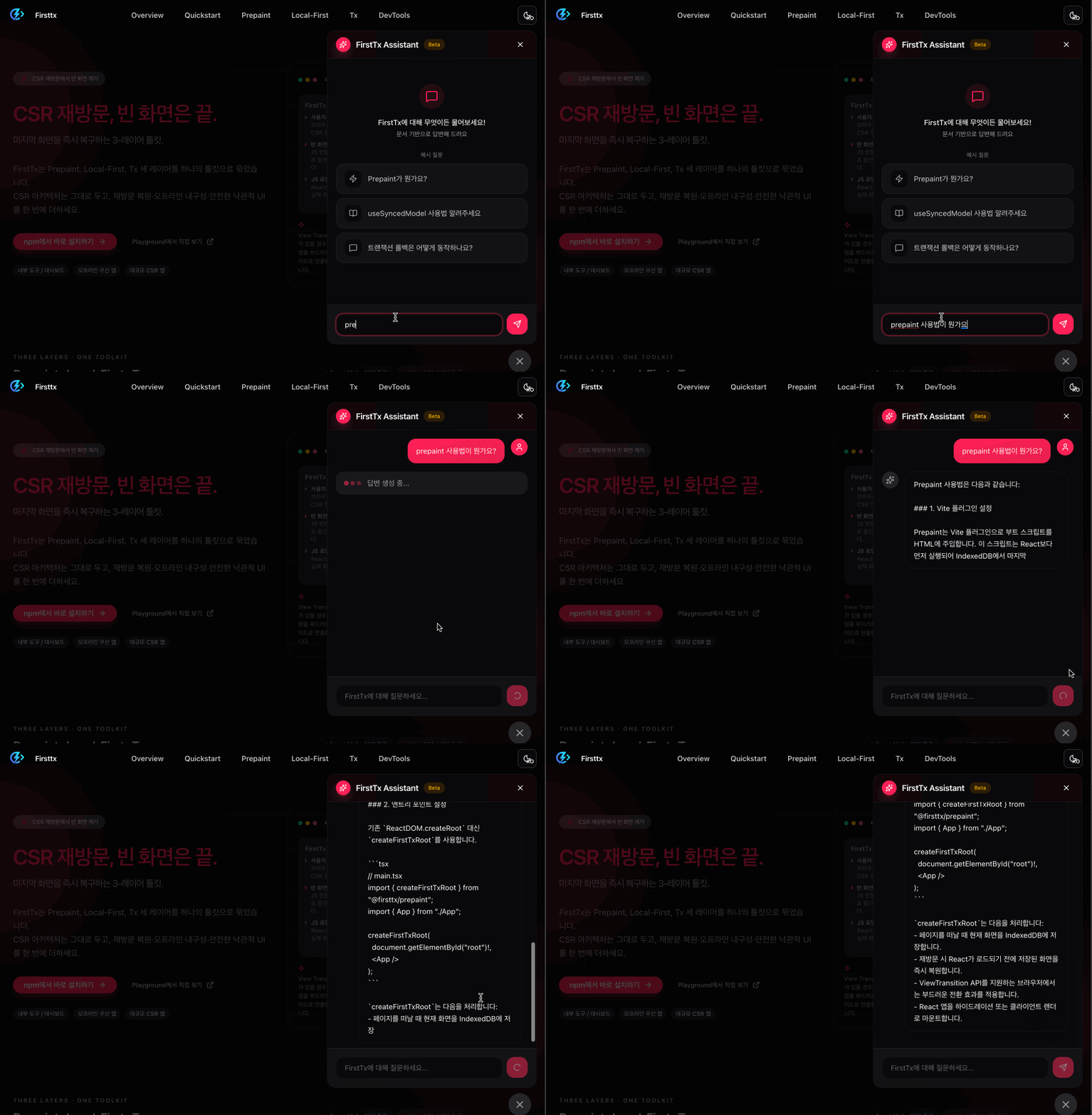
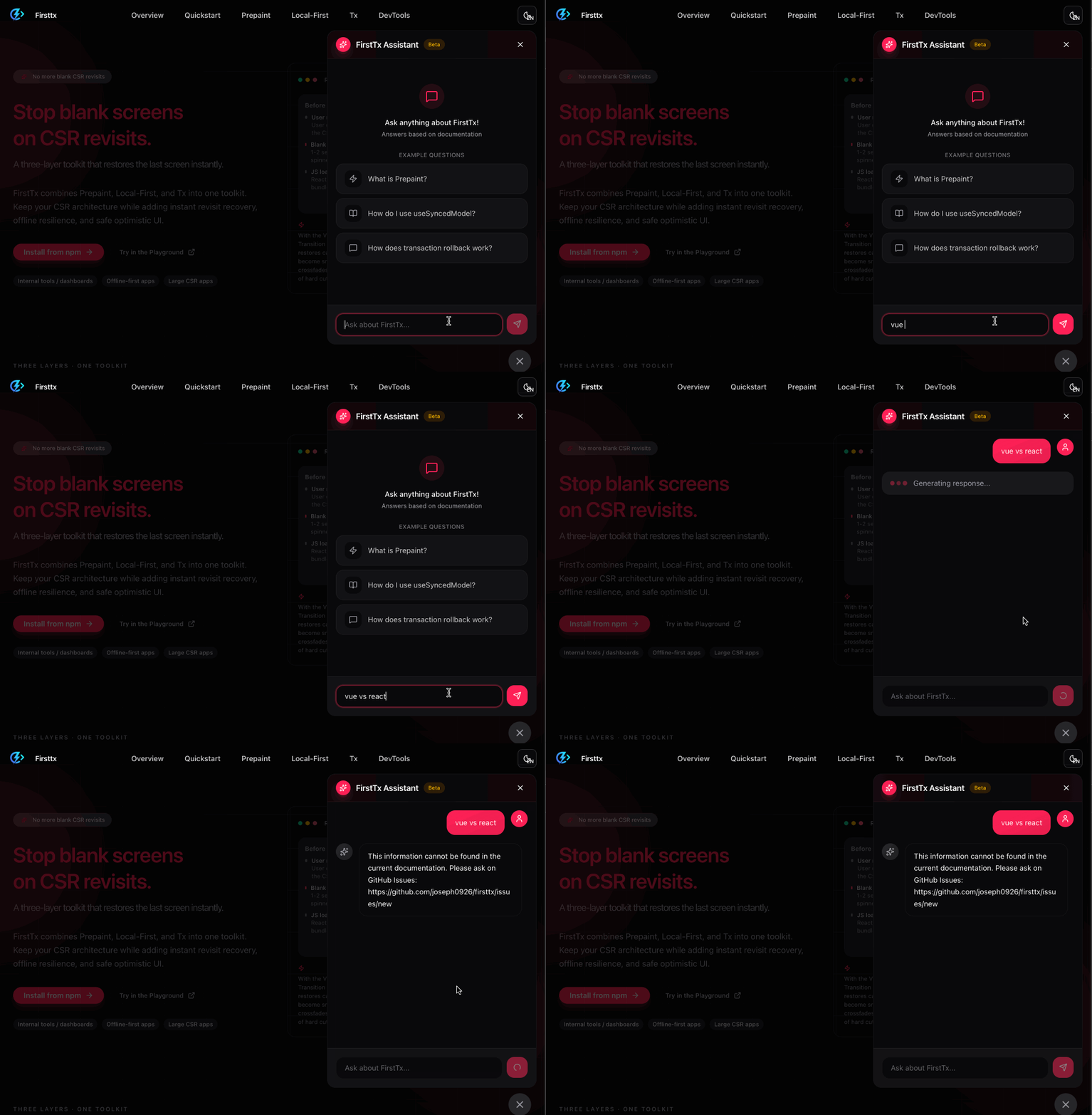
The completed chatbot operates as follows.
When asking questions related to Firsttx - RAG based response
When asking unrelated questions - scope information
The first thing to decide when implementing an AI chatbot was “which model” to choose.
For this, cost and performance had to be considered, and I referred to OpenAI's model comparison document.
What I noticed here was cost-performance.
| Model | Input (1M) | Output (1M) | Features |
|---|---|---|---|
| gpt-4o-mini | $0.15 | $0.60 | Cheapest, enough for document Q&A |
| gpt-4.1-mini | $0.40 | $1.60 | Longer context, slightly more expensive |
| gpt-5-mini | $0.25 | $2.00 | Specialized inference, high output cost |
Due to the nature of document chatbots,
The last point was especially important. gpt-5-mini has a cheap input, but its output is $2.00, which is more than three times that of gpt-4o-mini ($0.60).
In cases where the answer is long, such as a document chatbot, the output cost accounts for most of the total cost, so gpt-4o-mini was judged to be the most reasonable.
LLM basically allows you to answer questions about “what you know.” In other words, because it is not generally known like Firsttx and there is no data for newly created information, LLM produces strange answers by making answers impossible or non-existent.
To solve this, we search documents related to the question and provide them as context to LLM, and LLM is able to use that data to answer what it did not know.
The problem is that computers cannot directly compare the meaning of text. That's why we do embedding.
As mentioned earlier, computers cannot directly compare the meaning of text. So, after converting the text to numbers, we find and return the vector related to the question.
For example, the text "Prepaint solves blank screen issues in CSR apps" is converted to [0.023, -0.156, 0.891, ...] (1,536 numbers).
Now, if a user asks, "I see a white screen when I revisit," this question will also be converted to a vector, and since the two vectors are semantically similar, we can find relevant documentation.
If it was a keyword search, "blank screen" and "white screen" would not have matched because they are different words.
Additionally, a dedicated DB that stores these embedding vectors and quickly searches for similar vectors is called Vector DB.
What is similar to a regular DB is that it stores and reads data.
However, the key difference is that a general DB can only search for exact matches or inclusions, and it is impossible to find semantically similar values.
For example,
WHERE content LIKE '%blank screen%' → "white screen" and "blank page" are not foundThis Semantic Search is the core of RAG.
Based on this concept, it was actually implemented as follows.
I chose OpenAI's text-embedding-3-small.
import OpenAI from 'openai';

const openai = new OpenAI({ apiKey: process.env.OPENAI_API_KEY });

async function embed(text: string): Promise<number[]> {
  const response = await openai.embeddings.create({
    model: 'text-embedding-3-small',
    input: text.trim(),
  });
  return response.data[0].embedding;
}
I compared several options.
| DB | Advantages | Disadvantages |
|---|---|---|
| Supabase pgvector | PostgreSQL integration, familiar | Vercel AI SDK official support |
| Pinecone | Mature Ecosystem | Limited free tier |
| Upstash Vector | Vercel AI SDK official support, free 10K/day | Relatively new |
As a result, we chose Upstash Vector.
This is the process of saving documents in vector DB. This task only runs once when the document changes.
Document (markdown) → Chunking → Embedding → Save Upstash Vector
Chunking is the process of dividing a document into appropriate sizes. Since embedding the entire document reduces search accuracy, we split it into sections.
I chose heading based chunking. Since the MDX document was already logically divided into H1/H2/H3, I used this structure as is.
function chunkMarkdown(content: string, docId: string): Chunk[] {
  const lines = content.split('\n');
  const chunks: Chunk[] = [];

  let currentH1 = '';
  let currentH2 = '';
  let currentH3 = '';
  let currentContent: string[] = [];

  function saveChunk() {
    const text = currentContent.join('\n').trim();
    if (text.length > 0) {
      chunks.push({
        id: `${docId}-${chunks.length + 1}`,
        title: currentH1,
        section: currentH3 || currentH2 || currentH1,
        content: text,
      });
    }
    currentContent = [];
  }

  for (const line of lines) {
    // Check more specific patterns (###) first
    if (line.startsWith('### ')) {
      saveChunk();
      currentH3 = line.slice(4);
    } else if (line.startsWith('## ')) {
      saveChunk();
      currentH2 = line.slice(3);
      currentH3 = '';
    } else if (line.startsWith('# ')) {
      saveChunk();
      currentH1 = line.slice(2);
      currentH2 = '';
      currentH3 = '';
    } else {
      currentContent.push(line);
    }
  }

  saveChunk(); // Save last section
  return chunks;
}
When a user question comes in, it goes through the following process:
Question → Embedding → Search Upstash Vector → Relevant chunks → Pass as context to LLM
import { Index } from '@upstash/vector';

const index = new Index({
  url: process.env.UPSTASH_VECTOR_REST_URL,
  token: process.env.UPSTASH_VECTOR_REST_TOKEN,
});

async function searchDocs(query: string, topK = 5) {
  const queryVector = await embed(query);

  const results = await index.query({
    vector: queryVector,
    topK,
    includeMetadata: true,
  });

  return results.map((r) => ({
    content: r.metadata?.content,
    section: r.metadata?.section,
    score: r.score,
  }));
}
The retrieved chunks are included in the system prompt and delivered to LLM.
const systemPrompt = `
You are a Firsttx document assistant.
Please refer to the document below to answer your questions.

## Reference document
${chunks.map((c) => `### ${c.section}\n${c.content}`).join('\n\n')}
`;
I used Vercel's AI SDK. Version 5 is the latest and has good integration with Next.js.
pnpm add ai @ai-sdk/react @ai-sdk/openai
Implemented chatbot API with Next.js App Router's Route Handler.
// app/api/chat/route.ts
import { streamText, convertToModelMessages, type UIMessage } from 'ai';
import { chatModel } from '@/lib/ai/openai';
import { retrieveContext, buildSystemPrompt } from '@/lib/ai/rag';

export async function POST(req: Request) {
  const { messages }: { messages: UIMessage[] } = await req.json();

  // Extract questions from last user message
  const lastUserMessage = messages.findLast((m) => m.role === 'user');
  const userQuery =
    lastUserMessage?.parts
      ?.filter((part) => part.type === 'text')
      .map((part) => part.text)
      .join(' ') || '';

  // RAG: Search for related documents
  const { contextText } = await retrieveContext(userQuery);
  const systemPrompt = buildSystemPrompt(contextText);

  // Call LLM (Streaming)
  const result = streamText({
    model: chatModel,
    system: systemPrompt,
    messages: convertToModelMessages(messages),
  });

  return result.toUIMessageStreamResponse();
}
Chat UI was implemented with the useChat hook.
// components/chat/chat-panel.tsx
'use client';

import { useState, useMemo } from 'react';
import { useChat } from '@ai-sdk/react';
import { DefaultChatTransport } from 'ai';

export function ChatPanel() {
  const [input, setInput] = useState('');

  const transport = useMemo(
    () => new DefaultChatTransport({ api: '/api/chat' }),
    []
  );

  const { messages, sendMessage, status } = useChat({ transport });

  const handleSubmit = (e: React.FormEvent) => {
    e.preventDefault();
    if (!input.trim()) return;
    sendMessage({ text: input });
    setInput('');
  };

  return (
    <div>
      {messages.map((message) => (
        <ChatMessage key={message.id} message={message} />
      ))}

      <form onSubmit={handleSubmit}>
        <input
          value={input}
          onChange={(e) => setInput(e.target.value)}
          placeholder="Enter your question..."
          disabled={status === 'streaming'}
        />
      </form>
    </div>
  );
}
Due to the nature of the beta service, we had to prevent excessive use. Implemented triple restrictions using Upstash Redis.
| Restriction type | Limited amount | target | Purpose |
|---|---|---|---|
| Bundang | 10 times | Per IP | Prevent requests in rapid succession |
| Daily | 50 times | Per IP | Prevent personal overuse |
| Total daily | 1,000 times | All services | Beta cost cap |
import { Ratelimit } from '@upstash/ratelimit';
import { Redis } from '@upstash/redis';

const redis = new Redis({
  url: process.env.UPSTASH_REDIS_REST_URL,
  token: process.env.UPSTASH_REDIS_REST_TOKEN,
});

// per minute limit
const perMinuteLimit = new Ratelimit({
  redis,
  limiter: Ratelimit.slidingWindow(10, '1 m'),
  prefix: 'chat:minute',
});

// daily limit
const perDayLimit = new Ratelimit({
  redis,
  limiter: Ratelimit.slidingWindow(50, '1 d'),
  prefix: 'chat:day',
});

// Total daily limit
const globalDayLimit = new Ratelimit({
  redis,
  limiter: Ratelimit.slidingWindow(1000, '1 d'),
  prefix: 'chat:global',
});

export async function checkRateLimit(ip: string) {
  const [minuteResult, dayResult, globalResult] = await Promise.all([
    perMinuteLimit.limit(ip),
    perDayLimit.limit(ip),
    globalDayLimit.limit('global'),
  ]);

  if (!minuteResult.success) return { success: false, limitType: 'minute' };
  if (!dayResult.success) return { success: false, limitType: 'day' };
  if (!globalResult.success) return { success: false, limitType: 'global' };

  return { success: true };
}
Since the document site supports Korean/English, the chatbot also had to support multiple languages.
Use of Vector DB Namespace
Instead of creating separate indexes for each language, we used Upstash Vector's Namespace feature.
// When indexing
index.namespace('ko').upsert(koChunks);
index.namespace('en').upsert(enChunks);

// When searching
index.namespace(locale).query({ vector, topK });
Why we chose Namespace
Multilingual system prompts
const SYSTEM_PROMPTS = {
  en: (context: string) => `You are a FirstTx document assistant.
Please refer to the document below and answer in Korean.
${context}`,

  en: (context: string) => `You are the FirstTx documentation assistant.
Answer in English based on the following documents.
${context}`,
};
| item | Estimated monthly cost |
|---|---|
| OpenAI API | ~$5 |
| Upstash Vector | Free (10K/day) |
| Upstash Redis | Free (10K/day) |
| Vercel | ~$20 (Pro) |
| Total | ~$25 |
Based on 50 to 100 uses per day, the low price of gpt-4o-mini allowed us to keep our LLM costs below $5 per month.
1. RAG is simpler than you think
It looks complicated, but the key is “Retrieve → Inject context → Call LLM”. Implementation was easy thanks to good libraries (AI SDK, Upstash).
2. Chunking strategy is important
Heading-based chunking makes good use of document structure. Search accuracy largely depends on chunking quality.
3. Namespace is better than metadata filtering
Metadata filtering has limitations when supporting multiple languages. It is more efficient to separate the search space by Namespace.
Attaching an AI chatbot to a document was not as difficult as I thought. Thanks to Upstash's free tier and gpt-4o-mini's low price, you can run it for less than $25 per month.
I hope this helps those who have similar concerns.